 PDF Bridge
- PDF Bridge
- Tools
- Bank statement to Excel
Convert bank statements from PDF to Excel
Turn a bank or card statement PDF into a clean Excel spreadsheet on your phone. Dates stay dates, amounts stay numbers, and every running balance is checked so you know the sheet adds up before you rely on it.
- Free to try
- No account needed
- Files deleted after converting
Why use PDF Bridge to convert a bank statement PDF to Excel
Copying a bank statement into a spreadsheet by hand takes an hour and one wrong digit spoils the totals. Most PDF converters make it worse: amounts arrive as text, descriptions that run over two lines split into extra rows, and the balance column no longer matches.
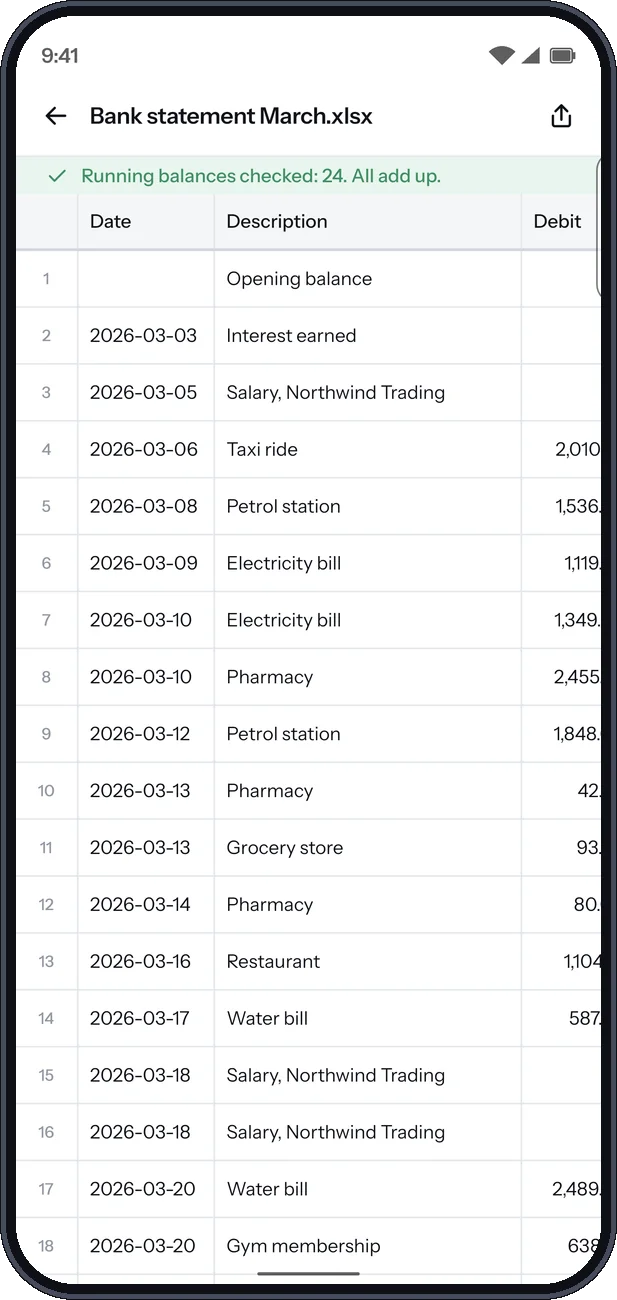
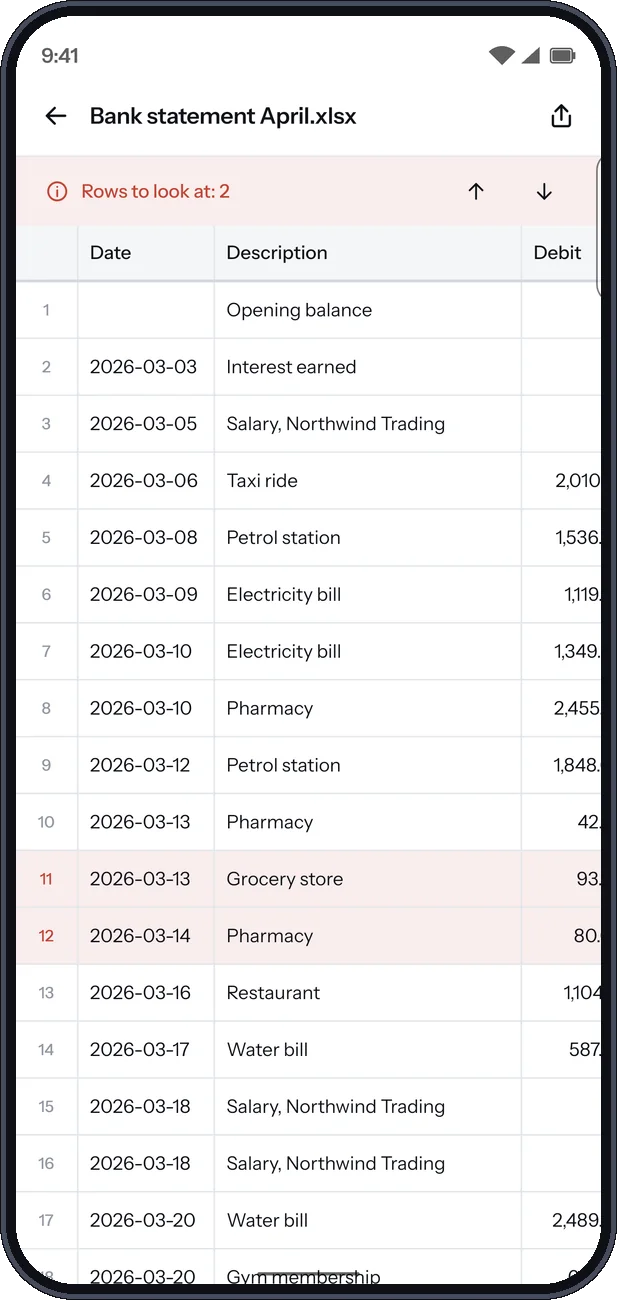
PDF Bridge reads the statement the way an accountant would. It keeps each transaction on one row, turns dates and amounts into real Excel values you can sort and add up, and then checks every running balance against the one before it. If a row doesn't add up, it is highlighted and listed on a separate Checks sheet, so you know exactly which line to look at.
How to convert a bank statement PDF to Excel on your phone
Open the statement
Pick the PDF from your files, email or chat, or share it to PDF Bridge from your banking app.
Convert to Excel
If the statement is locked, type its password once. Scanned or photographed statements are read with OCR.
Check and share
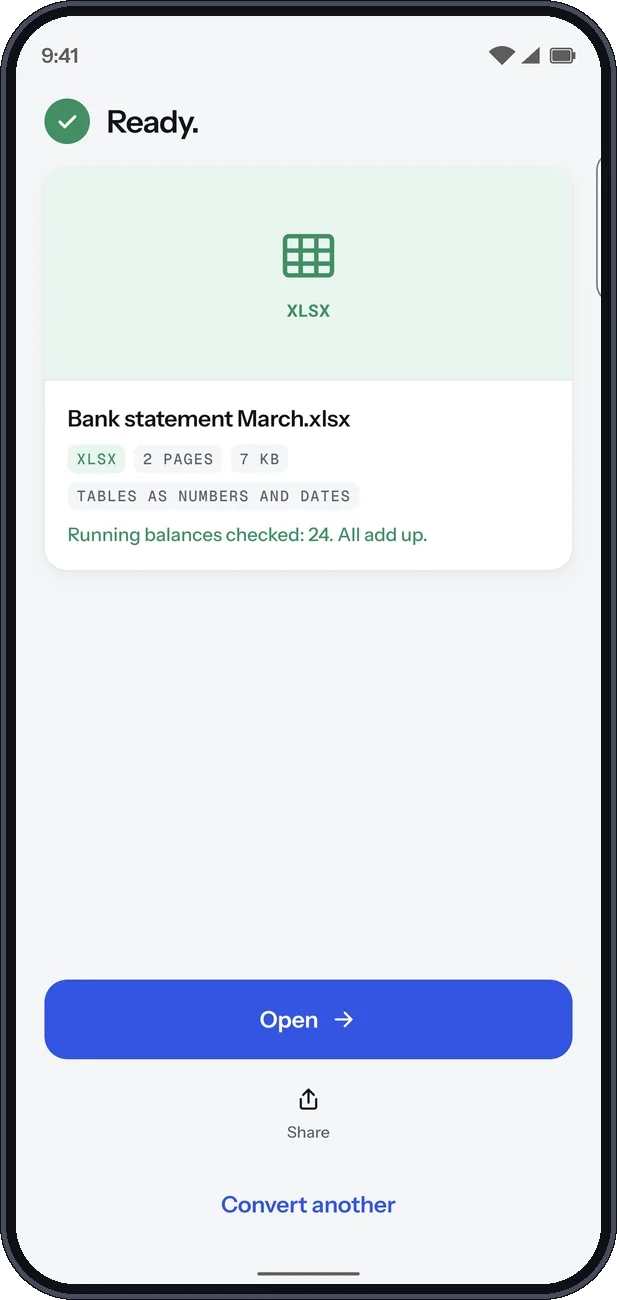
See how many balances were checked, open the sheet in the app, then share the .xlsx or open it in Excel or Google Sheets.
Made for real documents
Running balances checked
Each balance is worked out from the one before it. Rows that don't match are marked, not hidden.
Real numbers and dates
Amounts arrive as numbers and dates as dates, so totals, filters and pivot tables work straight away.
One row per transaction
Descriptions that wrap onto two or three lines stay in one row with their amount.
Password-protected PDFs
Many banks lock statements with a date of birth or account number. Type it once and the file opens.
Scans and photos too
A printed statement photographed with your phone is read with OCR and checked the same way.
Any currency and number style
1,234.56, 1.234,56 and lakh-style 1,23,456.00 are all read as the right amount.
Bank statement to Excel in PDF Bridge
Handy for
- Loan and mortgage applications
- Visa and rental applications
- Tax returns
- Bookkeeping and accounting
- Budgeting and expense tracking
- Business expense claims
Bank statement to Excel: frequently asked questions
Which banks does it work with?
It doesn't rely on templates for particular banks: it reads the table on the page, so it works with statements from most banks and card issuers. Because every balance is checked, you can see straight away whether a statement came out right.
Can it open a password-protected bank statement?
Yes. When a statement is locked, the app asks for the password, which is often your date of birth or part of your account number. It is used only to open that file and is not saved.
Will the amounts be numbers in Excel?
Yes. Amounts and dates are stored as real Excel numbers and dates, not text, so SUM, sorting and filters work without any clean-up.
What does the balance check do?
For each transaction, the app works out what the balance should be from the previous balance and the amount, and compares it with the balance printed on the statement. Matching rows are counted; rows that differ are highlighted and listed on a Checks sheet.
Can I convert a scanned or photographed statement?
Yes. Scans and phone photos are read with OCR, then laid out and checked like any other statement. A clear, flat, well-lit photo gives the best result.
Is it free?
You can convert 2 files a week for free, up to 10 MB each. Pro removes the weekly limit, takes files up to 50 MB and lets you edit cells and rows in the app and check the balances again.
Is my bank statement kept on your server?
No. The file is sent over an encrypted connection to be converted and deleted as soon as the result reaches your phone, or after about an hour at most. The spreadsheet is saved only on your phone.
Works well with
Try Bank statement to Excel free
2 free files every week, no account needed. Your files are deleted after converting and saved only on your phone.